Why Register for the Laji.fi Service?
By registering with Laji.fi, you gain access to services provided by the Finnish Biodiversity Information Facility that require a user account, such as:
- Notebook observation system: Record observations in your personal journal or participate in monitoring programmes.
- Quality control: Take part in verifying observations.
What Does Registration Involve?
Registered users have a public profile and a user account, which always includes:
- Name
- Email address (not displayed publicly)
You can also add the following to your profile:
- Authentication methods (e.g. Google, Facebook, iNaturalist, Haka)
- Other user accounts (e.g. Hyönteistietokanta, Hatikka, Lintuvaara). Observations from these accounts will appear among your own observations on Laji.fi, but these accounts cannot be used to log in to the Finnish Biodiversity Information Facility.
- Friends: You can record shared observations in Vihko (friend requests must be accepted).
- A profile picture and personal description.
Please note! Avoid creating multiple user accounts. Instead, link all your information to a single account.
How to Register for Laji.fi
- Open the Laji.fi website and click the “Log in / Register” button in the upper-right corner.
- Choose an authentication method:
- Create a new Laji.fi account (username + password), or
- Log in using an existing account (e.g. Google or Facebook).
Regardless of which method you choose, a user account will be created with the Finnish Biodiversity Information Facility.
Please note: You do not need a separate Laji.fi username and password if you use another authentication method.
Registering with a Laji.fi Account
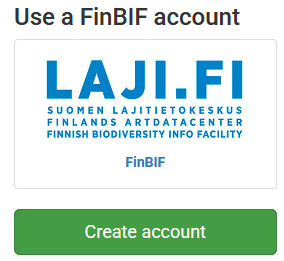
- Select the green “Create account” button on the left.
- Enter the required information:
- Email address
- Name (your full name is recommended, as it will be displayed in places such as monitoring programme results).
- Password (the minimum requirements are displayed on the right-hand side of the page).
- Click “Create”.
Verify your email address
- You will receive a verification email.
- Open the email account you used to register and click the verification link.
- If you cannot find the message, check your spam folder.
Continue to the service
- Click the “Continue” link to return to the service where you started the registration process.
- If the link does not work, navigate to the service you want to use and log in with your new account.
Forgot your password?
- You can request a password reset link by email (for Laji.fi accounts only).
Registering Using Another Authentication Method
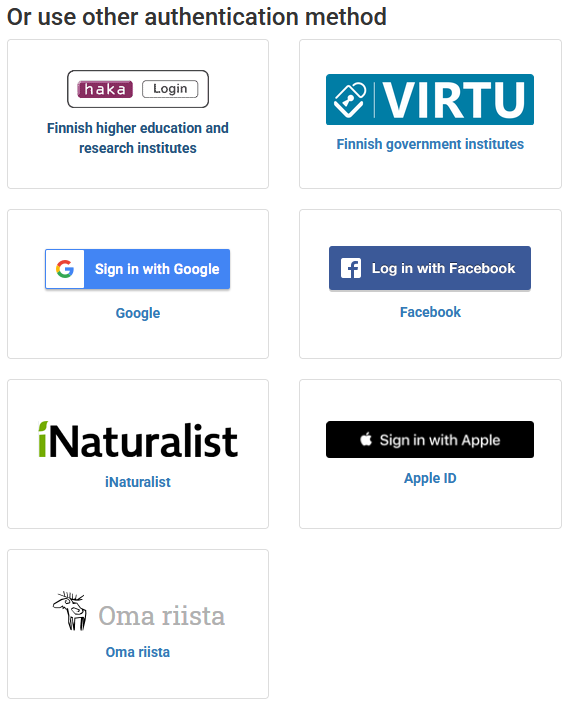
- Select your preferred authentication method and log in (e.g. Google, Facebook or Haka).
- The Finnish Biodiversity Information Facility will display a form pre-filled with information obtained from your authentication provider:
- Name
- Email address
You can edit this information. We recommend using your full name, as it will be displayed in places such as monitoring programme results.
Verify your email address
- After saving your information, you will receive a verification email at the address you provided.
- Open the email and click the verification link to activate your account.
- If you cannot find the message, check your spam folder.
Continue to the service
- Click the “Continue” link to return to the service where you started the registration process.
- If the link does not work, navigate to the service you want to use and log in with your new account.
Complete Your Laji.fi Profile
- Log in to the Laji.fi portal.
- In the upper-right corner, select Your Name → Profile.
Edit your profile
– Click the gear icon to:
- Add a profile picture (by providing the image URL).
- Write a short personal description.
Manage friends and your user account
- On the same page, you can manage your friends in the Vihko observation service.
- You can also access user account management (you will need to log in again).
Change Your Personal Information After Registration
You can manage your authentication methods, name, password and other account details through the Finnish Biodiversity Information Facility’s user account management service.
How to Access Account Management

You can also go directly to:
https://login.laji.fi/
Laji.fi Forum
To log in to the Laji.fi Forum, use your Finnish Biodiversity Information Facility account (i.e. any of the available authentication methods).
However, the forum maintains a separate profile, profile picture and other discussion-related information. You can use a username or pseudonym on the forum.
When creating your Finnish Biodiversity Information Facility account, however, please provide your real name, as it will be displayed alongside your recorded observations and quality control annotations.
Deleting Your Account
You can delete your Finnish Biodiversity Information Facility account by logging in to account management and following the instructions under “Change Your Personal Information After Registration”, or by going directly to: https://login.laji.fi.
In account management, you will find a “Delete account” button.
When you delete your account:
- Your personal information and authentication details will be cleared.
- Your username will be changed to “Poistettu / Removed”.
- The name associated with observations you have submitted will also be changed to “Poistettu / Removed”.
Please note that this process may take some time.
Content you have contributed will not be deleted. This includes observations, photographs, species descriptions, trait information and other contributions.
Any account you may have created on the Laji.fi Forum is separate and must be deleted separately through that service.