User authorization and login service
FinBIF has a login service (https://login.laji.fi) that can be used in 3rd party applications. There are two authentication flows, one for web applications and another for native applications.
Concepts
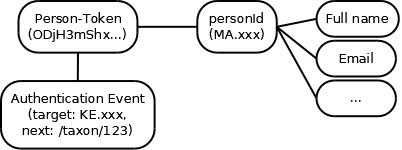
- Person-Token – A secret generated for the target system that identifies the person.
- personId – Person’s public identifier. Person’s name and nickname/group are publicly available, other person information can be accessed using a Person-Token
- When user logs in, a new Person-Token is generated. The original Authentication Event information is stored with the token, for example the target system and the optional next parameter that the target system provided, which can be used to redirect the user to the page the user was trying to access when starting to log in.
Web application login flow
Prerequisites
- Register an Access Token for your web application to api.laji.fi (or apitest.laji.fi)
- The Access Token must be associated to an information system. It will get an identifier (KE.xxxx). Contact helpdesk@laji.fi and provide:
- Email that you used when registering the Access Token
- Name of your application
- Description for the purpose of your application
- The URL where the user should be redirected after logging in
The flow
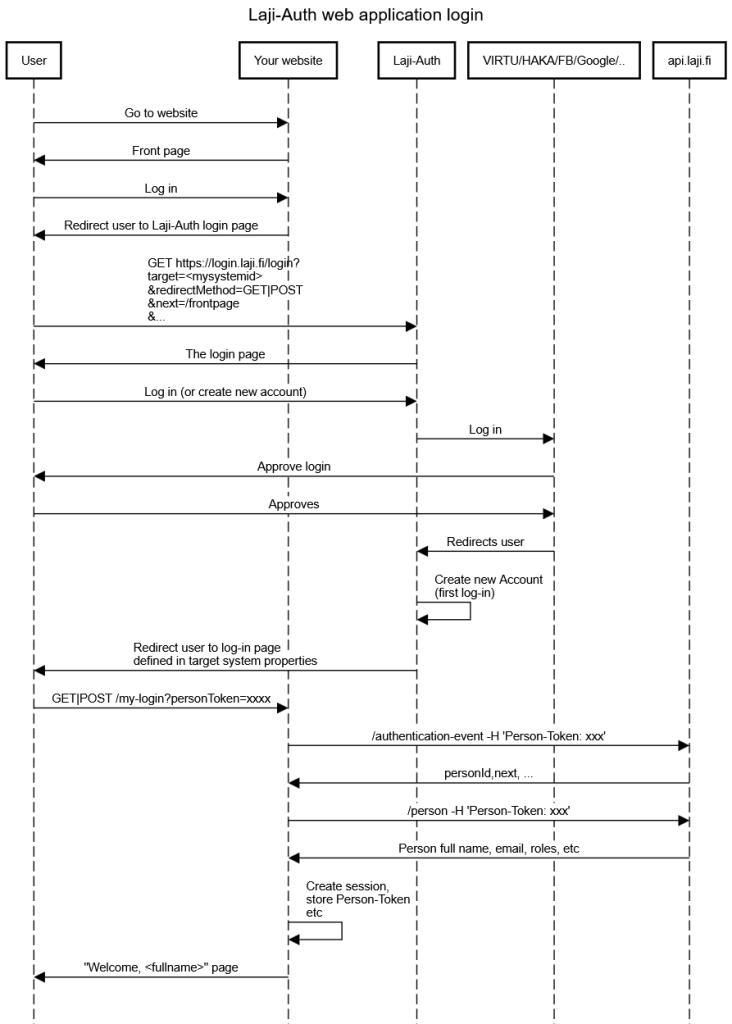
Generating Laji-Auth login page link: Production log in page is located at https://login.laji.fi/login and test site (used with apitest) at https://login-dev.laji.fi/login. The following parameters must/can be provided:
- target=KE.xxx – id of your application
- redirectMethod – GET|POST (default POST)
- next – The value will be returned as it is; can be used to tell what page the user was headed or any other information
- offerPermantent – true|false (default false); if true a checkbox will be shown to the user that offers the user to create a never expiring Person-Token
- locale – fi,en,sv – Will affect the language of the log in page
See /authentication-event and /person endpoint for more information.
Native app login flow
Prerequisites
- Register an Access Token for your web application to api.laji.fi (or apitest.laji.fi)
- The Access Token must be associated to an information system. It will get an identifier (KE.xxxx). Contact helpdesk@laji.fi and provide:
- Email that you used when registering the Access Token
- Name of your application
- Description for the purpose of your application
- Mention that you want to use native app login (instead of web redirection based login)
The flow
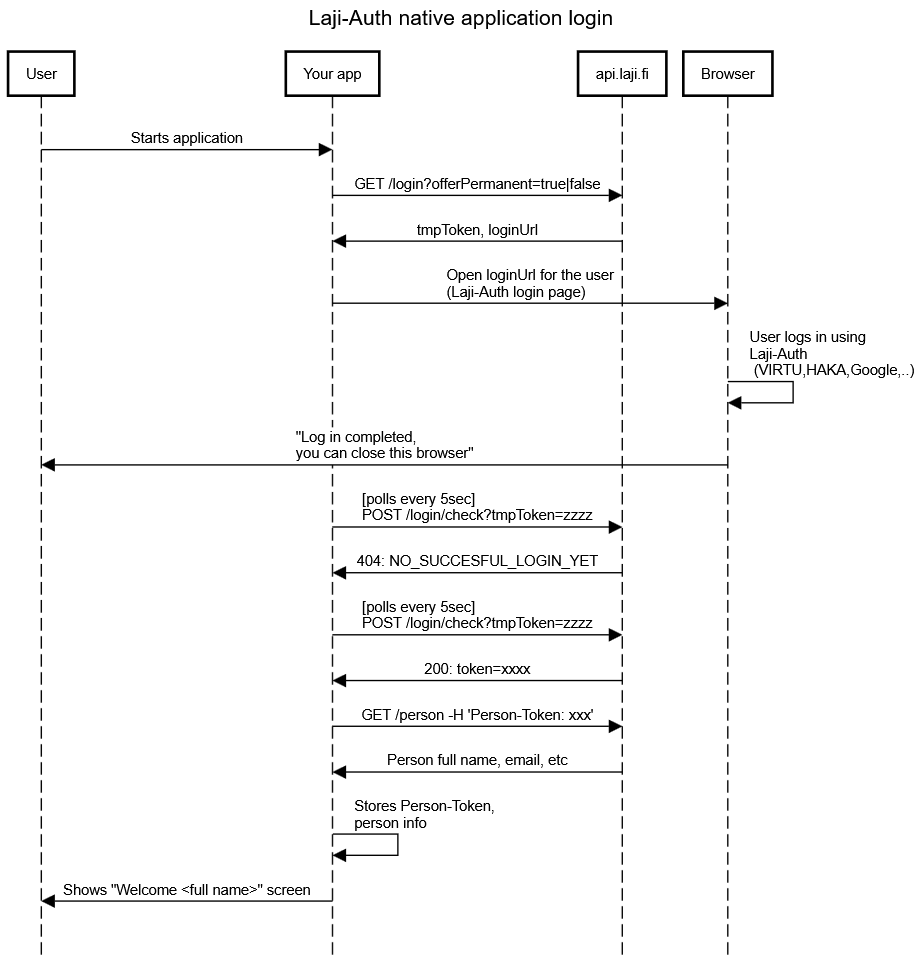
Step #1 App makes request GET api.laji.fi/login and receives response
HTTP 200:
{
"tmpToken": "tmp_ODJhY2FmZDUtNWIyMS00MTNlLWFiMDAtYjUzMzA2ODQ5NWMw",
"loginURL": "https://login.laji.fi/login?target=KE.xxx&redirectMethod=POST&next=%2F%3FtmpToken%3Dtmp_ODJhY2FmZDUtNWIyMS00MTNlLWFiMDAtYjUzMzA2ODQ5NWMw&offerPermanent=true"
}
Step #2 App stores the tmpToken, starts polling step #4 and opens the loginURL for the user in a browser
Step #3 User logs in using Laji-Auth in a web browser
The user has 30 minutes to complete the log in before the tmpToken expires.
Step #4 (polling). The app makes request POST api.laji.fi/login/check?tmpToken=xxx
The response is either
HTTP 404
NO_SUCCESFUL_LOGIN_YET
or after the user has completed the login
HTTP 200
{ "token": "xxx" }
The app has 1 minute to fetch a real Person-Token using the tmpToken. The minute starts after the user has completed the login. When Person-Token has been fetched, the tmpToken will expire immediately.
Step #5 Fetch user person information, store Person-Token